Introduction
Day 1
- Immediate phone call to the sales rep
- Interview sales rep to learn about the client
- Get their sales notes
- Phone call (made by Campaign Manager)
- Welcome to Venta and thank you for business
- Brief introduction
- Schedule Kick-Off meeting
- Send follow up email
- Email Template (ANSWER & NO ANSWER)
- Supporting documents
- Questionnaire
- Campaign Manager in-house setup
- Create Google Drive folder
- Create a campaign brief
- Create TeamWork Client and Project(s)
- Add task template
Kick-Off Meeting
Day 2 – 5
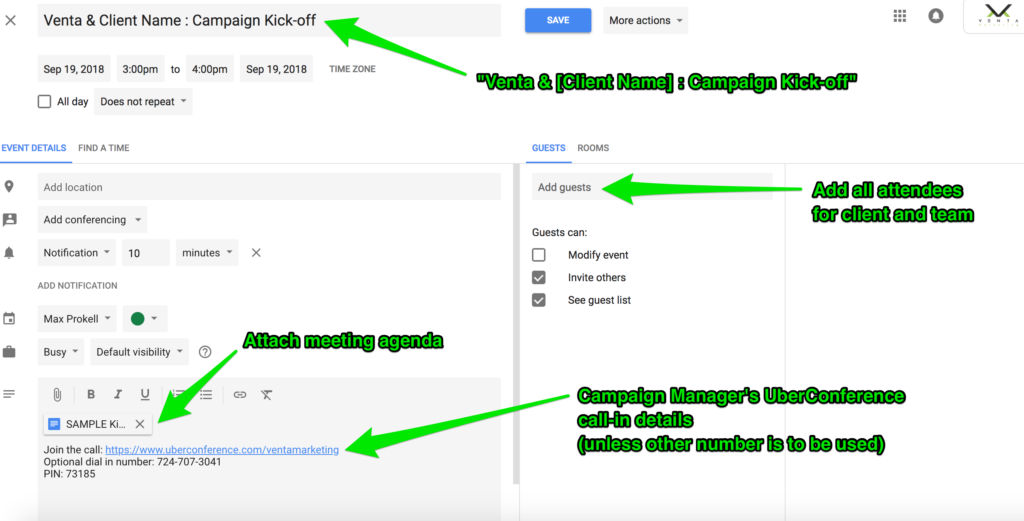
- Calendar Invite – sent immediately upon setting kick-off meeting
- Event title: (Venta & [Company Name] : Campaign Kick-off)
- Include team and all client contacts
- Attach the meeting agenda to invite
- Provide call-in details via your Uber Conference
- Email meeting confirmation (sent the morning before the day of the meeting)
- Agenda
- Include call-in details
- Include team and all client contacts that are on the meeting
- Meeting Agenda (Template)
- Introduce key players
- Campaign Manage
- Sale Representative
- Explain onboarding and campaign management process
- Review goals
- Review and support proposal
- Finalize campaign brief
- Define next steps and confirm the launch date
- Set campaign planning presentation meeting
- Introduce key players
- Kick-Off follow up email
- Define next steps
- Define items needed (if any)
Campaign audit and strategy development
Day 5 – 15
- Audit
- Technical
- Backlinks
- On-page (tagging)
- Content
- Local SEO
- User-experience
- Keyword mapping
- SERP analysis
- Develop recommended strategy
- Develop proposed timeline
- Develop baseline report
Campaign launch presentation
Objective: approval in 7 days or under
Day 15 – 20
- Send meeting agenda to client and team
- Attendees
- Account Manager
- Digital Marketing Manager
- Confirm campaign goals
- Present audit
- Present strategy
- Present and send baseline report
Launch
Day 25
- Launch Campaign
- Post-launch check list