Usage Guidelines
- These are the proper instructions to create an effective link building campaign as well as provide tips, tricks, best practices, and ideas for developing link building concepts and campaigns
Prospects & Asset Conceptualization
The chicken or the egg. Do you come up with an idea and then find an audience OR find an audience and then cater an idea specifically for them. In my experience, the latter works best.
Here are the steps to a successful campaign:
- Find a niche, targetable audience
- Develop an asset specifically for that audience
- Prospect for websites within your target audience, gathering contact information
- Complete link asset(s)
- Draft email template(s)
- Begin outreach
- Prospect for additional websites
- Review email metrics and adjust as needed
- Continue outreach
Find a niche, targetable audience
Making sure you have an audience is key to creating good link building assets that work.
- Be specific to who you are targeting
- i.e. not just adults or men or women
Develop an asset specifically for that audience
After you have an audience, conceptualize a connection between them and your client that fills a need. This is often an educational/informational need but can also be an emotional need (i.e. a funny or sad story that is shareable).
- Connect your client with the audience
- Find a needed informational or emotional need for content
- i.e. Parents with children, worry about head injuries, head injuries require medical attention, Argus Radiology is a medical imagery service, create an asset focusing on TBIs
- Research the topic and specifically the existing content/infographics etc.
- Find a way to do better, improve on, or fill gap compared to the existing content
- Narrow your research to that area and create your asset
Prospect for websites
See our Finding New Link Opportunities (Prospecting for Sites) page for more details.
- Use advanced search terms and eliminators in prospect list
- Narrow your search to include only your target audience
- websites, blogs, news/media
- Create your website list for outreach
Email templates
Nearly as important as your asset is your email that you will use to reach out to potential link opportunities. Here are some tips that have worked for us in the past.
Much of email it trial and error so it is often recommended that your segment out your outreach list so different email strategies to see which performs best.
- Short and specific with assets attached and ready
- Be breif and include the link assets ready for immediate use to show the reader you are serious and to make it aas easy as possible to use
- Tease and ask questions
- Make an email asking if they would be interested in free infographics about topics X,Y, or Z and tease that you are able to write this content for them free
- When they reply with interest present them with the finished asset even if it is not the topic they were interested in
- Detailed and extensive
- long emails typically don’t work well. but sometimes, for the audience they do
More information on Outreach can be found on our Link Building Outreach and Follow-up page.
Review email metrics
No two campaigns are the same. Making sure activate and review click and open rates can help you identify what is working and what is not.
- Subject line is KEY
- If you are not getting opens it is because of your subject line, change things up and try a different subject
- If your opens rates are good but you are not getting any responses, then your content is the issue
- Maybe it is too long, too breif, or not geared towards your audience as well as it should be
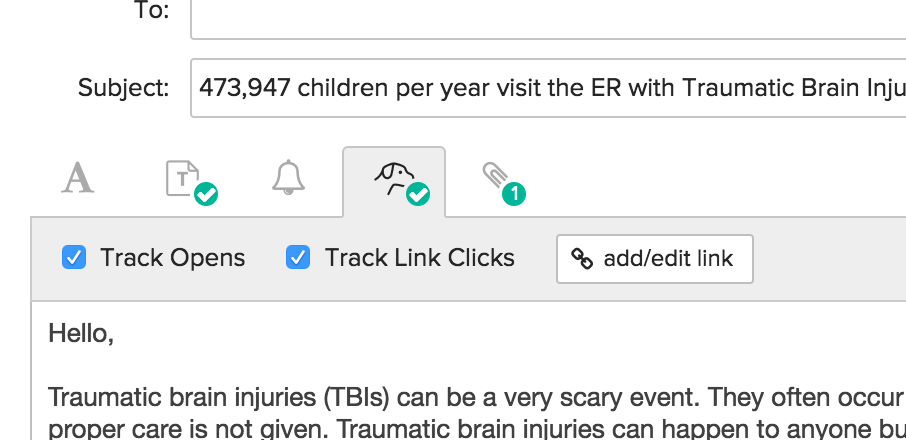
How to activate email metrics in BuzzStream
- Email metrics are found when you are about to send an email either with a template or custom email
- The icon of the dog has two boxes to check, track opens and track click
- Check both boxes
- The settings are not automatic and need to be reset with each email campaign