About Gap Audits & Guidelines
- Gap audits are another small part of our process and the 8 Pillar SEO Audit. We perform gap audits to find out where our client’s competitors are getting linked to opportunities and then we review the quality of those mentions to see if they are worthy of keeping. Gap audits allow us to find any new opportunities based on competitor research.
Our Goal
- Use SEMRush to identify competitor backlinks that we have potential to also receive.
Finding Gap Audit Opportunities
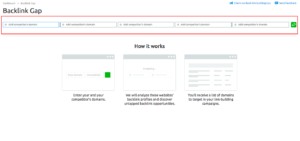
- Login SEMrush and select "Backlink Gap"
- Enter the client’s primary domain first Root Domain
- Example - "https://www.ventamarketing.com"
- Add in known direct competitor domains
- Only do 4 main competitors or less - hit "Enter"
- NOTE: If you log out at any given time, you will need to reenter the competitors and client domains to re-populate the Total Backlink results.
- SEMrush will populate the "Total Backlinks" results.
- Filter the results by "Domain Score/Authority" - anything less than 15 is not a credible opportunity.
-
Export the results to your computer as a CSV and save the list in the client's folder (Venta Drive > "Client Name" > SEO > Link Building)
- Save the CSV with the title formatted as follows: "Mention Audit - Month-Year - Gap Audit". Once this has been done, return to BuzzStream to qualify the results.
- If the domain score is in the 30-40+ range and the opportunity seems worth pursuing - use BuzzBar to add it to the list of opportunities.
- TIP: Look for sites that ask for guest post content specifically when prospecting.
Using BuzzBar to Qualify Opportunities
- If you haven't already, download the "BuzzBar Chrome Extension" and a small striped banner icon will appear in your browser window bar on the right-hand side.
- Click the banner icon to enter and save website information more easily.
- TIPS: BuzzBar isn't always able to pull in the field information as quickly as we like so it make take a few seconds or you may need to refresh the BuzzBar. If BuzzBar is failing to populate every field, then save it and return to the saved page of BuzzBar results to add more details to the profile.
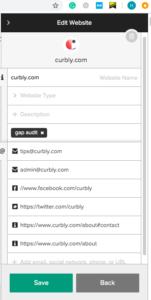
- IMPORTANT: Add Tags: #gap audit
Gap Audit Outreach
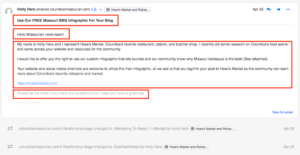
- Once your gap audit opportunities have been identified, use the BuzzStream email feature to perform the outreach step.
- Know that hyperlinks do not work in BuzzStream email feature so you must include full links to your client's website in your email content. You can also attach any assets that would be helpful to that media outlet as well.
- Your email content should always include:
- A polite introduction/greeting,
- The Ask "Please link to my client's website in exchange for this content",
- A reason as to why it would be beneficial for that media source to link to them,
- and a closing/"Thank You".
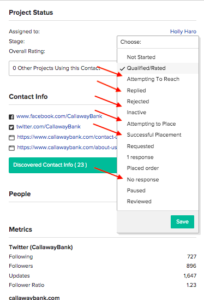
- Don't forget to update the number of times you email your contact during outreach in BuzzStream. If the media source responds and says that they will link to your client, change the BuzzStream profile status from "Attempting To Reach (#)" to "Attempting To Place". Once the follow link is live then update the status to "Successful Placement".
- If you reach 3 outreach attempts and do not receive a response, change the profile status from "Attempting To Reach (3)" to "No Response".