Introduction
Day 1
- Immediate phone call (made by Campaign Manager)
- Welcome to Venta and thank you for business
- Brief introduction
- Schedule Kick-Off meeting
- Send follow up email
- Email Template (to set up kick-off meeting)
- Supporting documents
- Organic Social Welcome Packet [CREATE]
- Kick-off Meeting Agenda
- Organic Social Media Questionaire
- Organic Social FAQs
- The Venta Way
- Campaign Manager in-house setup
- Create Google Drive folder
- Create asset library
- Create a campaign brief
- Complete all know/confirmed items in brief
- Create TeamWork Client and Project(s)
- Add task template
- Create Google Drive folder
Kick-Off Meeting
Day 2 – 5
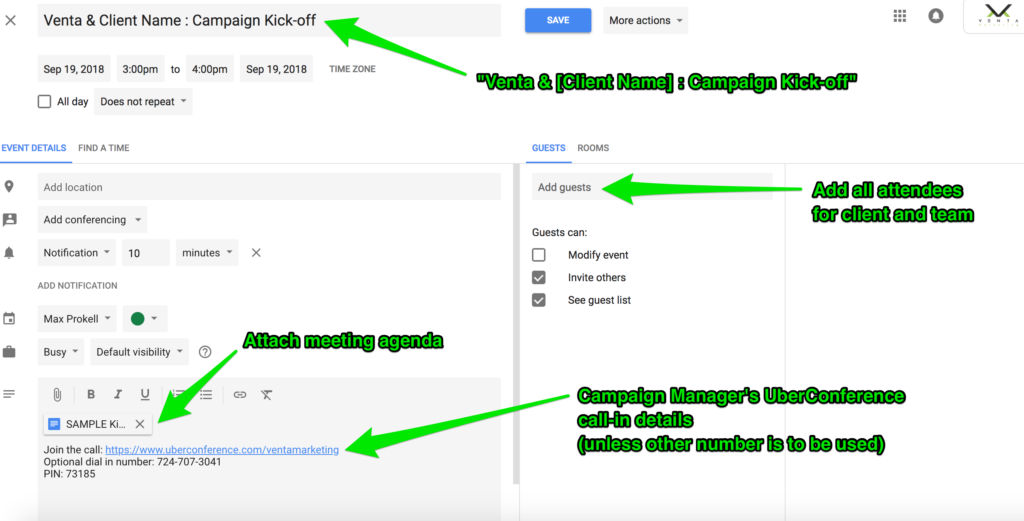
- Calendar Invite – sent immediately upon setting kick-off meeting
- Event title: (Venta & [Company Name] : Campaign Kick-off)
- Include team and all client contacts
- Attach the meeting agenda to invite
- Provide call-in details via your Uber Conference
- Email meeting confirmation (sent the morning before the day of the meeting)
- Agenda
- Include call-in details
- Include team and all client contacts that are on the meeting
- Meeting Agenda (Template)
- Introduce key players
- Campaign Manager
- Sale Representative
- Social Media Specialist
- Review and support proposal
- Explain on-boarding and campaign management process
- Complete campaign brief
- Define next steps/meeting and confirm the launch date
- Set Campaign Planning & Alignment Presentation meeting
- Introduce key players
- Kick-Off follow up email
- Define next steps
- Define items needed (if any)
Research and Campaign Planning
Objective: align design inspiration and content with the client’s goals and brand
Day 5 – 10
- Create campaign planning presentation (BUILD INVISION BOARD)
- Brand standards and company alignment
- Campaign overview
- Platform
- Post frequency
- Boost budget
- Conversion goal
- Analysis of Current Social Platform
- Competitor Research & Analysis
- Reach Strategy
- Influencers
- Social pages to share
- Blogs to follow
- Hashtags and tagging
- Promotion opportunities
- Brand voice
- Post-types
- Develop asset library (Google Drive) [CREATE THIS]
- Images
- Videos
- Events Calendar
- Create InVision post board (include review cadence)
- Create baseline report
Campaign Alignment & Planning Presentation
Objective: complete alignment with the client on campaign and design direction
Day 10 – 15
- Send meeting agenda to client and team (Meeting Agenda Template)
- Attendees
- Campaign Manager
- Social Media Specialist
- Set campaign launch presentation
- Follow up email to client defining next steps
Build Campaign
Day 15 – 20
- Create a campaign calendar for month-1
- Create all posts for month-1
- Send Campaign Manager presentation
- Revisions due within 24 hours
Campaign launch presentation
Objective: approval in 7 days or under
Day 20 – 25
- Send meeting agenda to client and team (Meeting Agenda Template)
- Attendees
- Campaign Manager
- Agenda
- Confirm campaign details, lead visuals, and goals
- Present month-1 posts
- Present baseline report
- Confirm launch or next
Launch
Day 25
- Launch Campaign
- Post-launch checklist