Usage Guidelines
- Every Social Media client will have a monthly post calendar
- Post creation calendar schedule
- Send to Account Services for review 2 weeks before end of the month
- Sent to client for approval 1 week before end of the month
- Publishing posts
- Post content will be scheduled from the post calendar into the appropriate channel after client approval
- It is the responsibility of the Social Media Strategist to ensure that Account Services delivers timely approval of the post calendar from the client
- Once posts are scheduled, social media for the client is considered complete for that month unless otherwise instructed or a time-sensitive post opportunity comes up that could benefit the client’s goals.
Where to Find
- The monthly post calendar can be found in Drive > Clients > ** Example Client Folder > Social
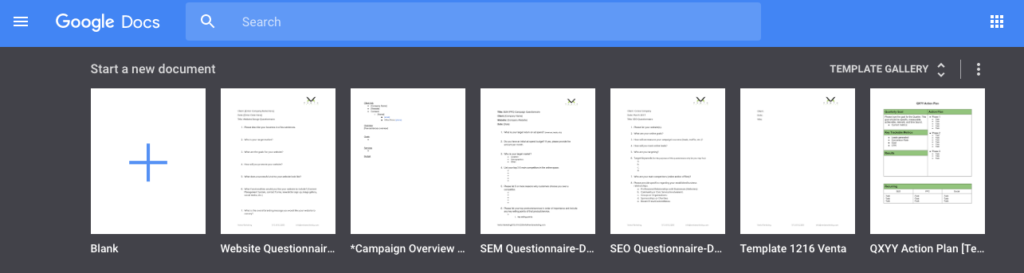
- The template can also be added to a clients folder by going to docs.google.com, clicking “template gallery”, and selecting the “**Post Calendar MMYY Client” template
Where to Save
- The monthly post calendar should be saved in Drive > Clients > [Specific Client Folder] > Social > Post Calendars
- When a new calendar year begins, all post calendars from the previous year should be placed into another folder titled as the previous year
Column Explanations
- Publish Date: The date that the post will be scheduled to go live. Formatted MM/DD/YY
- Day of Week: The day of the week that corresponds with the Publish Date. Formatted M, T, W, Th, F, S, Sn
- Time: The time that the post will be scheduled to go live. Formatted HH:MMam/pm
- Channel: The social media platform that the post will be published to
- Copy: The text that will be used in conjunction with the image to make the most effective post at achieving the client’s goals. In the example, “39% of people will stop engaging with a website if images won’t load or take too long to load. — Adobe”

- Media: The visual asset that will be used to draw the visitor’s attention. Place the image if an image is used for the post. Place a screenshot of the thumbnail being used if any other type of media is used. Examples of other media could include but are not limited to:
- Video
- Live Stream
- FB Poll
- 360 Video
- Canvas
- Post Type: