About Mention Audits & Guidelines
- Mention audits are just a small part of our process and the 8 Pillar SEO Audit. We perform mention audits to find out if our clients are unaware of any online mentions/links to their website and then we review the quality of those mentions to see if they are worthy of keeping. Mention audits allow us to remove any mentions/links that may have negative side effects on a website and help us identify any Follow Links that we wish we had.
- Mention audits can be used in any Link Building Campaign.
Our Goal
-
Clean up online mentions and identify new follow link opportunities.
Mention Audit Instructions
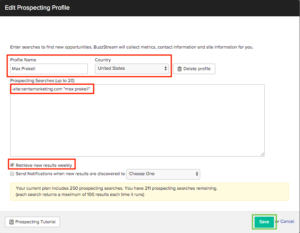
- Once the client has been set up in BuzzStream’s projects you will create a Prospecting List by clicking the “Add Websites” menu, scrolling down to “Find Prospects” and selecting “Create New Prospecting Profile”.
- A Prospecting Profile window will generate and you will enter “Mention Audit” in the Profile Name form field. Next, set the location of the client by country.
- Enter your Prospecting Searches by entering: -site:[the client’s URL] “[client’s business or employee name]” then select the “Check Results Weekly” checkbox before saving. NOTE: The business name and employee names must be entered into individual Prospecting Profiles.
- Example: -site:ventamarketing.com "venta marketing"
- Example: -site:ventamarketing.com "max prokell"
- Example: -site:ventamarketing.com “jake sheafer“
- For more on Google Search Operator, tips check out this article
- For more on Google Search Operator, tips check out this article
- Once you have saved your individual Prospecting Lists, click “Retrieve New Results” and BuzzStream will begin to pull in rows of links that include the business or employees name/info.
Qualifying Mention Audits
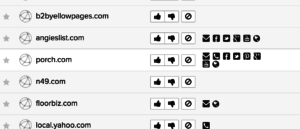
- Filter your results by “Highest-to-Lowest SERPS” to view the most valuable results more easily. You can always verify if a mention is valuable or not by using MozBar to tell you if they are Follow or NoFollow links. You can also review the Juice Passing Link score to verify the value of a mention - if it's really low, then don’t qualify the opportunity.
- Click on each link, explore the on-page content for any valuable mentions or links pertaining to the client and give it a ‘Thumbs Up’, ‘Thumbs Down’, or ‘Blacklist’ vote. Your votes will decide if each link is worthy, not worthy, or inappropriate for outreach. When you have qualified an opportunity, add details describing what the link is in the comment box. The valid links will be moved to the “Link Monitoring” stage in the BuzzStream CRM and the other links will be discarded.
- Once your qualified list and the task is complete, tag your supervisor in the TeamWork “@[supervisor name] task, enter the details of the task with the number of qualified results, and complete TeamWork task by checking it off.
NOTE: You can only “edit” a prospect list up to 3 times. If you have made a spelling or punctuation error while typing in your search operator phrase, then delete the list entirely so you don't spend time searching through inaccurate results. You can delete the list in the individual settings of each list window.
Mention Audit Outreach
Perform Outreach: Contact person who wrote the blog/author, webmaster, contact form.